Gradient Weather
subtle signalsWeather
4.447.00 Reviews
- Version
- Varies With Device
- Installs
- 50.00K
- Age Rating
- Everyone
Screenshots
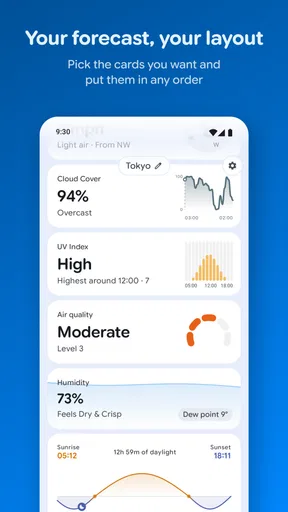
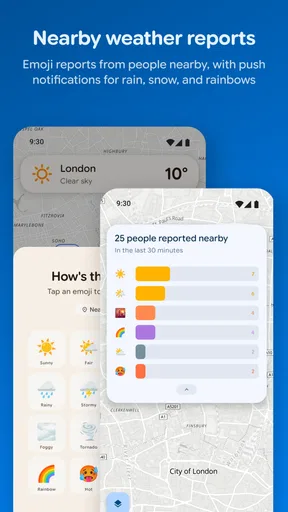
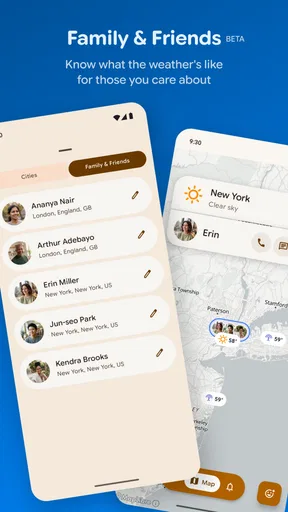
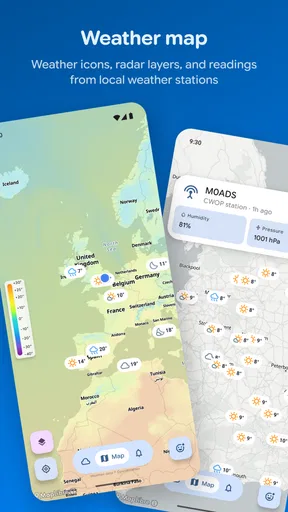
Our Review of Gradient Weather
 Analysis by Appyee
I spent time with Gradient Weather as a day-to-day weather app rather than treating it as a quick forecast widget. That distinction matters because its appeal is not only the information it presents, but also the way it lets the forecast feel more personal through Material You styling, custom themes, and weather alerts. It is a free weather app from subtle signals, aimed at people who want a cleaner, more individual-looking alternative to the often crowded default weather tools on a phone.
My overall impression is positive, especially when I want a forecast that is easy to glance at and visually less generic. The app is not automatically the best choice for every weather need, though. People who depend on highly detailed meteorological data, specialized warnings, or a very familiar mainstream layout may prefer a more established alternative. Where this app stands out is in the everyday experience: opening it, understanding the current conditions quickly, and making the interface feel more comfortable for different preferences and situations.
How Gradient Weather handles readability and navigation
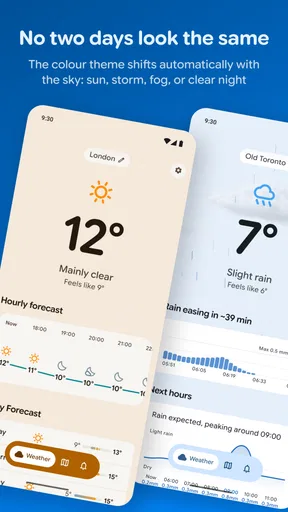
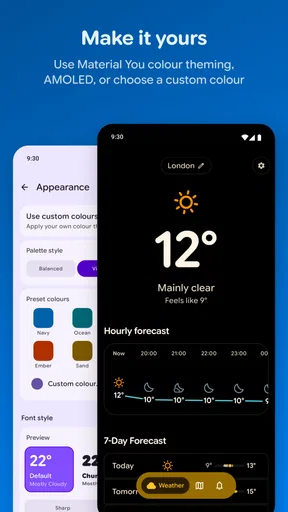
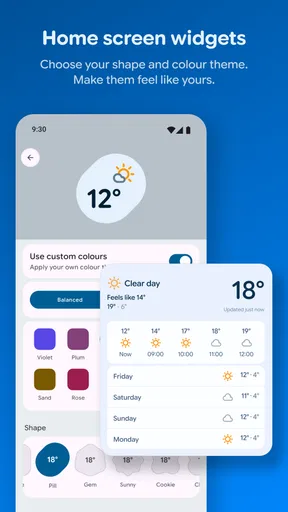
The first thing I noticed was the visual focus. Gradient Weather is built around the idea that weather information can be presented with personality instead of looking like a plain utility screen. Material You support gives it a natural fit on compatible Android devices, while custom themes let the appearance move closer to the way I prefer to read information. That is useful for someone who finds a default bright interface tiring, or who simply wants stronger visual separation between the current conditions and the rest of the forecast.
For me, the most important accessibility benefit is the ability to shape the visual environment before I need it. A theme is not just decoration when I am checking the phone outdoors, in a dim room, or while distracted. Contrast, color mood, and the amount of visual noise can affect how quickly I recognize the temperature and conditions. I would still judge each theme individually rather than assuming that every option is equally readable, but having a choice is better than being locked into one presentation.
The app’s weather-first purpose also helps navigation. I generally open a weather app with a small question: should I take a coat, delay a walk, or prepare for rain? A design that puts the current situation near the front reduces the number of decisions needed before I get an answer. Gradient Weather feels more suitable for that quick check than for slowly exploring a large collection of weather maps and technical layers.
That simplicity can be especially helpful for people who are uncomfortable with dense dashboards. Someone who does not regularly use weather apps may find a themed, focused interface less intimidating than a screen packed with radar controls, animated maps, advertising panels, and repeated alerts. I also think it suits older family members who mainly want current conditions and a straightforward forecast, provided the chosen theme remains legible and the text size works comfortably on their device.
There is a trade-off here. A visually calm screen can make the most important information easier to find, but it may also provide less immediate context than a traditional weather service. If I need to compare several days, inspect changing conditions hour by hour, or investigate a storm system, I would want to spend time learning exactly how much detail the app exposes. Gradient Weather’s strongest experience is the quick, personal forecast—not necessarily the role of a complete weather workstation.
Using themes as a practical reading tool
My advice is to choose a theme based on the place where you check weather most often, not only on which one looks attractive in a screenshot. A soft or low-light style may be comfortable indoors at night, while a clearer, higher-contrast choice may work better during a bright commute. If the app lets you preview several styles, I would test them with the phone held at the distance I normally use rather than judging them up close.
This is also where the app’s customization can help people with different sensory preferences. Some users become distracted by strong colors or busy animation, while others need obvious visual differences to separate conditions quickly. A personal theme cannot solve every readability issue, but it gives the user more control than a single fixed design. The useful part of customization is not making the forecast prettier; it is making the forecast easier for me to recognize under real conditions.
Navigation should also be considered alongside attention. When I am leaving home, carrying bags, or checking the screen between other tasks, I do not want to interpret a complicated visual hierarchy. A weather app earns its place through fast recognition. Gradient Weather’s focused identity works in its favor here, although users who need extensive technical detail may find that the same restraint feels limiting.
Motor, sensory, and cognitive considerations
Weather apps are often used with one hand, outdoors, or while moving from one place to another. That makes touch targets, scrolling demands, and the amount of precision required important even when an app is not marketed as an accessibility tool. In my experience, Gradient Weather is most comfortable when I use it for short checks rather than long sessions. I can open it, read the relevant conditions, and put the phone away without navigating through an elaborate workflow.
That short-session design is helpful for users with limited dexterity or reduced tolerance for repeated gestures. A person who finds small controls frustrating may prefer an app that does not require constant map manipulation or several layers of menus just to see the basic forecast. The practical test is simple: can I reach the information I need without tapping precisely while walking or holding something else? Gradient Weather appears better suited to that situation than a feature-heavy weather service.
At the same time, customization does not automatically mean full control over every accessibility preference. I would not assume that a particular theme guarantees sufficient contrast, or that the app replaces the operating system’s own display and text settings. Users who rely on enlarged text, screen readers, reduced motion, or other device-level adjustments should test the app with those settings enabled. The experience may differ depending on the phone and system configuration.
Color deserves special attention. Weather interfaces often use color to communicate warmth, cold, rain, or warning conditions, but color alone is not a dependable way to convey meaning for every reader. Gradient Weather’s themed approach makes it important to look for supporting text and familiar symbols rather than relying only on a background shade. If I have difficulty distinguishing similar colors, I would choose the clearest available theme and confirm that the written forecast remains understandable without interpreting the palette.
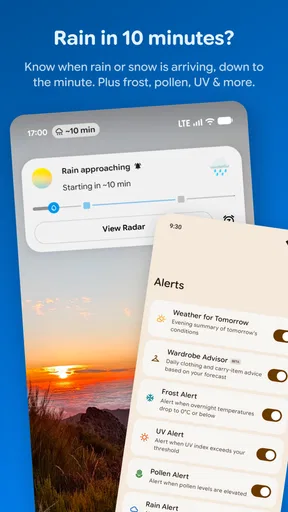
Alerts raise a different sensory question. Weather alerts can be valuable when I am busy or not actively checking the app, but notifications can also become disruptive if they arrive at inconvenient times or repeat information I already know. I would treat alerts as a feature to configure thoughtfully rather than enabling everything by default. For someone sensitive to sound or vibration, the phone’s notification controls are likely just as important as the app’s own choices.
There is a cognitive advantage to keeping the visual style consistent. Once I become familiar with where the current conditions and forecast appear, I spend less effort decoding the screen. A personalized theme may also make the app easier to recognize among other icons and notifications. However, users who switch between several phones or share a device may value a more conventional layout because it reduces the adjustment period.
Where the app fits into different routines
I can see Gradient Weather working well for a commuter who checks the forecast before leaving, a parent deciding whether children need waterproof clothing, or a remote worker planning a short break outside. In each case, the app’s value comes from reducing friction between opening the app and making a simple decision. The custom appearance is not essential to the weather question, but it can make the repeated habit feel more pleasant and more personally readable.
A realistic example is a morning walk on a day when the sky looks uncertain. I would check the current conditions, look ahead far enough to judge whether the walk is sensible, and use an alert as a reminder to pay attention to changing weather. If the interface is readable in the early morning and the important information is immediately visible, that is a better result than a technically impressive app that makes me search through several panels.
For travel, the situation is more complicated. A quick local forecast is useful when I arrive somewhere unfamiliar, but travelers may need more than a stylish presentation. They may want detailed hourly planning, multiple saved locations, severe-weather context, or information that remains easy to interpret when connectivity is inconsistent. I would test those needs before making Gradient Weather my only travel weather tool.
The same distinction applies to outdoor activities. For a casual picnic or neighborhood cycle, the app may be enough to support a basic go-or-wait decision. For hiking, boating, photography, construction work, or any activity where changing conditions carry serious consequences, I would compare it with a specialized service and local official warnings. A pleasant interface should never be mistaken for a substitute for the most appropriate safety information.
People with different sensory routines may also appreciate the ability to make the app feel less harsh. Someone who checks weather late at night may prefer a calmer theme, while someone who reads outdoors may need a brighter and more distinct presentation. The important point is that the app supports personal adjustment without forcing every user into the same visual experience.
Alerts, customization, and the everyday trade-offs
The alert feature is one of the reasons I would keep Gradient Weather installed instead of using it only as an occasional forecast viewer. Alerts can shift the app from something I remember to open into something that supports my routine automatically. That is useful when weather affects a commute, an appointment, or a planned outdoor activity. I would still avoid treating an alert as a guarantee that every important development will be covered; I use it as a prompt to check conditions, not as my sole safety plan.
Custom themes are similarly more useful over time than during the first five minutes. The novelty of changing colors fades, but the ability to settle on a style that matches my surroundings can make repeated checks less tiring. I would spend a little time comparing the themes in daylight and at night. A design that looks elegant in a dark room may be harder to read under direct sunlight, and a bright style that works outside may feel unnecessarily intense before bed.
The app is free to start, which makes that experimentation easy. There are in-app purchases ranging from $3.49 to $54.99 per item, so I would pay attention to what is included before buying anything. The wide range suggests that optional purchases may represent different levels or bundles, but I would make the decision based on the specific feature I actually need rather than assuming every paid option improves the basic forecast equally.
That pricing structure is a possible point of friction for someone looking for a completely simple, no-cost utility. A free download is welcome, but the presence of paid items means I would explain the app to a family member by saying: try the free experience first, then decide whether the extra customization or functions justify spending money. This is particularly important for users who want predictable costs or who may accidentally explore purchase screens without understanding the difference between options.
Compared with a phone’s built-in weather panel, Gradient Weather offers a stronger sense of ownership over the visual presentation. The default option is often faster to access and may already be adequate for a basic temperature check, but it can feel fixed. Compared with large weather platforms, Gradient Weather appears more focused and less demanding, while the larger services may be better for radar, detailed forecasting, or specialist information. I would choose this app for comfort and routine, not because it must replace every other weather source.
What may still create barriers
The biggest remaining barrier is that visual customization can create a false sense of universal accessibility. A theme that works for me may not work for someone else, and a gradient can sometimes compete with text instead of supporting it. I would not recommend choosing a theme solely for style. Read the forecast in the conditions where it will actually be used, and switch if the information takes longer to recognize.
Another barrier is the need to verify how the app behaves with the accessibility tools already built into the phone. People who depend on spoken output, enlarged interface elements, or reduced motion should try their usual settings immediately. The app may fit well into one person’s setup and poorly into another’s. That is not a reason to dismiss it, but it is a reason to test rather than assume.
Alerts can also be inaccessible in a practical sense if they are too easy to overlook or too disruptive to tolerate. Someone who does not hear notification sounds may need a visual or vibration cue that is noticeable but not overwhelming. Someone with sensory sensitivity may prefer fewer alerts and a quieter notification profile. I would configure the phone and the app together, because changing only one side may not produce the intended result.
Finally, the app’s focused identity may not satisfy users who need extensive weather context. If a decision depends on technical details, a broad regional picture, or specialized forecasting, a conventional weather service may be the better primary tool. Gradient Weather can still serve as a clean daily companion, but I would not force it into a role it was not designed to fill.
My inclusive verdict
After using Gradient Weather as a regular weather companion, I see its strongest quality in the way it lets a basic task feel more adaptable. Material You styling and custom themes give me room to choose a presentation that suits my eyes and surroundings, while alerts help the app remain useful when I am not actively checking it. Those qualities matter for accessibility because comfort, recognition, and reduced effort are part of whether an app works in real life.
The app is suitable for Everyone and has built a modest but clearly interested audience, with a 4.4 average from around 655 ratings and over 10K installs. It comes from subtle signals and was released on Apr 28, 2026. I mention those details because they place the app in context: it is a relatively young, focused weather choice rather than a service I would automatically treat as the universal standard for every forecasting need.
I would recommend it to someone who wants a free, visually personal weather app, values a calmer daily check, and likes the idea of adjusting themes instead of accepting the phone’s default look. It is also worth considering for users who find crowded weather dashboards tiring, as long as the chosen theme remains clear and the device’s own accessibility settings work comfortably with it.
I would steer a different user toward a more specialized alternative: anyone who needs advanced weather analysis, relies on a particular alerting system for serious outdoor work, or cannot comfortably read the available presentation after testing themes and system settings. The in-app purchase range also means budget-conscious users should explore the free experience carefully before committing to extras.
My final recommendation is to install it for a normal week rather than judging it from one glance. Check it in bright daylight, at night, during a busy morning, and when you are using one hand. Try more than one theme, configure alerts conservatively, and notice how quickly you can answer the weather question that matters to you. If those everyday tests feel easy, Gradient Weather is a thoughtful choice for a more personal and potentially more comfortable forecast routine. If they expose gaps in detail or readability, keeping a conventional weather service alongside it—or choosing one instead—will be the more inclusive decision.
Privacy and Permissions
See what permissions an app requests and how it handles your data.
- Contacts
- read your contacts
- Location
- approximate location (network-based), precise location (GPS and network-based)
- Wi-Fi connection information
- view Wi-Fi connections
- Other
- view network connections, full network access, run at startup, control vibration, prevent device from sleeping, Google Play license check
Verdict
Strengths of Gradient Weather
- Clean, modern interface with easy-to-read weather information.
- Provides attractive gradient backgrounds that match current conditions.
- Useful hourly and daily forecasts for quick planning.
- Supports location-based weather updates for your current area.
- Lightweight design makes checking the forecast fast and convenient.
Limitations of Gradient Weather
- Some advanced weather details may be limited compared with larger weather apps.
- Forecast accuracy can vary depending on location and data availability.
- Frequent location updates may increase battery consumption.
- Some features or visual options may require in-app purchases.
- Ad-supported areas can make the experience feel less streamlined.
Similar Picks in This Category
View All
Weather - By Xiaomi
Xiaomi Inc.4.1

Weather & Radar Forecast
WetterOnline4.8

Weather
OneLouder Apps4.6

AccuWeather: Weather Radar
AccuWeather3.6

The Weather Channel - Radar
The Weather Channel4.6

1Weather Forecasts & Radar
OneLouder Apps4.3
Frequently Asked Questions
What is Gradient Weather, and what does it offer?
Gradient Weather is a weather application designed to present current conditions and forecasts in a clean, visually appealing interface. After exploring the app, users can generally expect access to temperature readings, weather descriptions, precipitation information, wind details, and forecast updates. Its presentation focuses on making everyday weather checks quick and easy, although the exact features and data availability may vary by location and device.
How accurate are Gradient Weather’s forecasts and weather alerts?
Gradient Weather’s forecast quality depends on the meteorological data providers, your location settings, and the availability of local weather stations. In testing, weather apps are usually most reliable for current conditions and short-term forecasts, while predictions several days ahead can change. Users should enable location access and notifications if they want timely updates, but should not treat the app as a substitute for official emergency warnings.
Does Gradient Weather require location access or an internet connection?
Gradient Weather may request location permission to automatically display weather for your current area. You can often choose a location manually instead, which is useful if you want to monitor another city or prefer not to share precise location data. An internet connection is normally needed to refresh forecasts, radar information, and alerts. Previously loaded information may remain visible temporarily when you are offline.
Is Gradient Weather free to download, and are there advertisements or in-app purchases?
The availability of free features, advertising, and premium options can depend on the version of Gradient Weather and the platform where it is downloaded. Before installing, check the official Google Play Store or Apple App Store listing for current pricing and subscription details. If premium tools are offered, review the renewal terms carefully, since subscriptions may continue automatically until canceled through your store account.
Is Gradient Weather suitable for severe weather and travel planning?
Gradient Weather can be useful for checking routine conditions, planning commutes, choosing clothing, or preparing for short trips. However, users should be cautious during storms, flooding, extreme heat, or other dangerous events. Forecasts can change quickly, and app notifications may be delayed or unavailable in some regions. For serious weather situations, compare the information with alerts from local authorities and official meteorological services.
